
Magisk Manager is the essential app for handling root access on Android. Once you've rooted your device, it lets you control and approve root permissions for other apps. For added security, it offers biometric verification, requiring fingerprint or face recognition to authorize superuser requests.
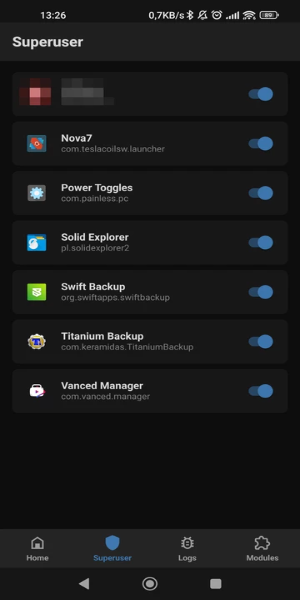
❤ Root Permission Management: With Magisk Manager, you can oversee root permissions on your Android device. After unlocking the bootloader and installing root files, this tool helps you grant or restrict root access to apps as needed.
❤ Advanced Security: For tighter protection, Magisk Manager supports biometric authentication. This ensures superuser permissions are only granted after fingerprint or facial verification.
❤ Root Module Installation: The app enables you to install various root-related modules. One popular example is the SafetyNet Fix module, which conceals root access and bootloader status from certain apps.
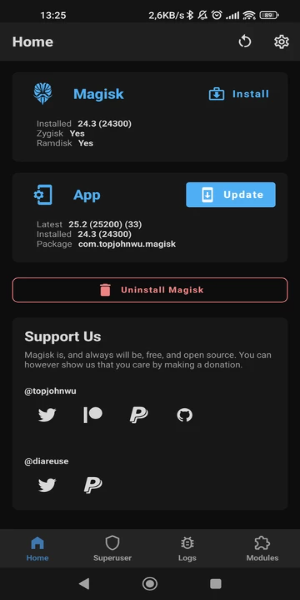
❤ Zygisk for Better Performance: From within the settings, you can enable Magisk with Zygisk. This feature helps developers create more efficient modules by preloading resources into system memory, boosting their performance.
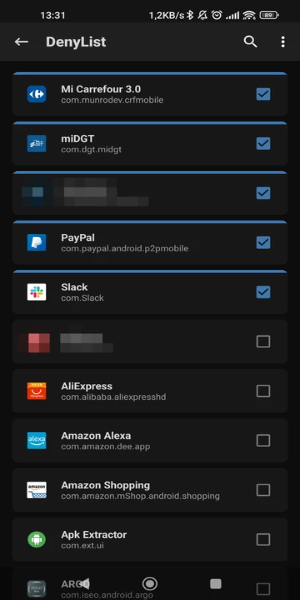
❤ Root Cloaking for Apps: You can selectively hide root access from specific applications—like games, banking, or payment apps—to bypass restrictions and use them without limitations.
❤ What does Magisk Manager do?
Magisk Manager is the official app for managing root permissions on Android devices. It lets users approve or deny root access requests and install modules to extend root functionality.
❤ Can I remove Magisk Manager?
Yes, you can uninstall it if you no longer need root access. However, uninstalling won't remove root from your device—you'll need to follow proper unrooting procedures separately.
❤ Is Magisk Manager safe to use?
When used correctly with trusted modules, Magisk Manager is generally safe. But since rooting involves risks, always proceed carefully and download modules from reliable sources.
User-Friendly Root Control
Magisk Manager offers an intuitive interface for managing root permissions on Android. Its streamlined dashboard makes it easy to approve or reject app requests for root access.
Biometric Protection
The app strengthens security with built-in biometric authentication. Configure fingerprint or face recognition to safeguard superuser permissions against unauthorized access.
Easy Setup Guide
Magisk Manager simplifies the initial setup process, including bootloader unlocking and file flashing. Even beginners can follow the clear steps to get started with rooting.
Transparent Permission Oversight
View and manage all root access requests in one centralized location. This makes it simple to adjust permissions and track which apps have elevated privileges.
Continuous Updates
The app receives regular updates to maintain compatibility with new Android versions and rooting techniques, ensuring optimal performance and reliability.
Latest Updates
Includes minor bug fixes and enhancements. Update to the newest version to experience these improvements!
Girls Frontline 2: Exilium Global Website Goes Live, Along With Its Socials!
Marvel Rivals: Understanding Bussing and Catching It
Top Skills to Prioritize for Yasuke in Assassin’s Creed Shadows
New Game Plus in Assassin's Creed Shadows: Confirmed?
Death Stranding 2 Release Date Unveiled in Massive Trailer
Assassin’s Creed Shadows Movements Reviewed by Two Parkour Athletes
Pokemon GO Leak Teases New Adventure Effects
Amazon Music Unlimited: Free 3-Month Trial Available

Dog & Cat Translator Prank
Download
ViewVeer
Download
Disney+ Hotstar
Download
MagicApp - AI Art Generator
Download
Amor AI: Flirty Companion
Download
Bentkey | Kids Entertainment
Download
n-Track Studio Pro | DAW
Download
Moises: The Musician's AI App
Download
myTuner Radio App: FM stations
Download
Adorama Is Clearing Out This Apple MacBook Pro M3 Pro Laptop by Offering a $700 Off Discount
Sep 20,2026

Dakota Johnson Insists Madame Web Disaster 'Wasn’t My Fault,' Points to Decisions 'Made by People Who Don't Have a Creative Bone in Their Body'
Sep 20,2026

Crunchyroll Brings White Day: A Labyrinth Named School to Global Players
Sep 16,2026

Best Buy Just Dropped the Best Meta Quest 3S VR Headset Deals for Black Friday
Sep 15,2026

FitRX Adjustable Dumbbells Offer Premium Build at Half Bowflex's Price
Sep 14,2026
 Category

 Download











Discover the best professional photography software! This comprehensive review features top-rated apps like ReLens Camera, PhotoKit AI Photo Editor, Pixlr, YouCam Perfect - Photo Editor, GCamera: GCam & HD Pro Photos, Photo Studio PRO, Lightleap by Lightricks, Google Camera, PhotoShot, and Photoroom. Compare features, user reviews, and pricing to find the perfect app for your photography needs, whether you're a beginner or a pro. Enhance your images with AI-powered tools, advanced editing capabilities, and stunning filters. Elevate your photography game today!
Photoroom AI Photo Editor
Photo Studio PRO
ReLens Camera
Pixel Camera
Pixlr – Photo Editor
YouCam Perfect - Photo Editor
PhotoKit AI Photo Editor