
Bleiben Sie während der Fernarbeit online mit unserer aktiven Mauslösung!
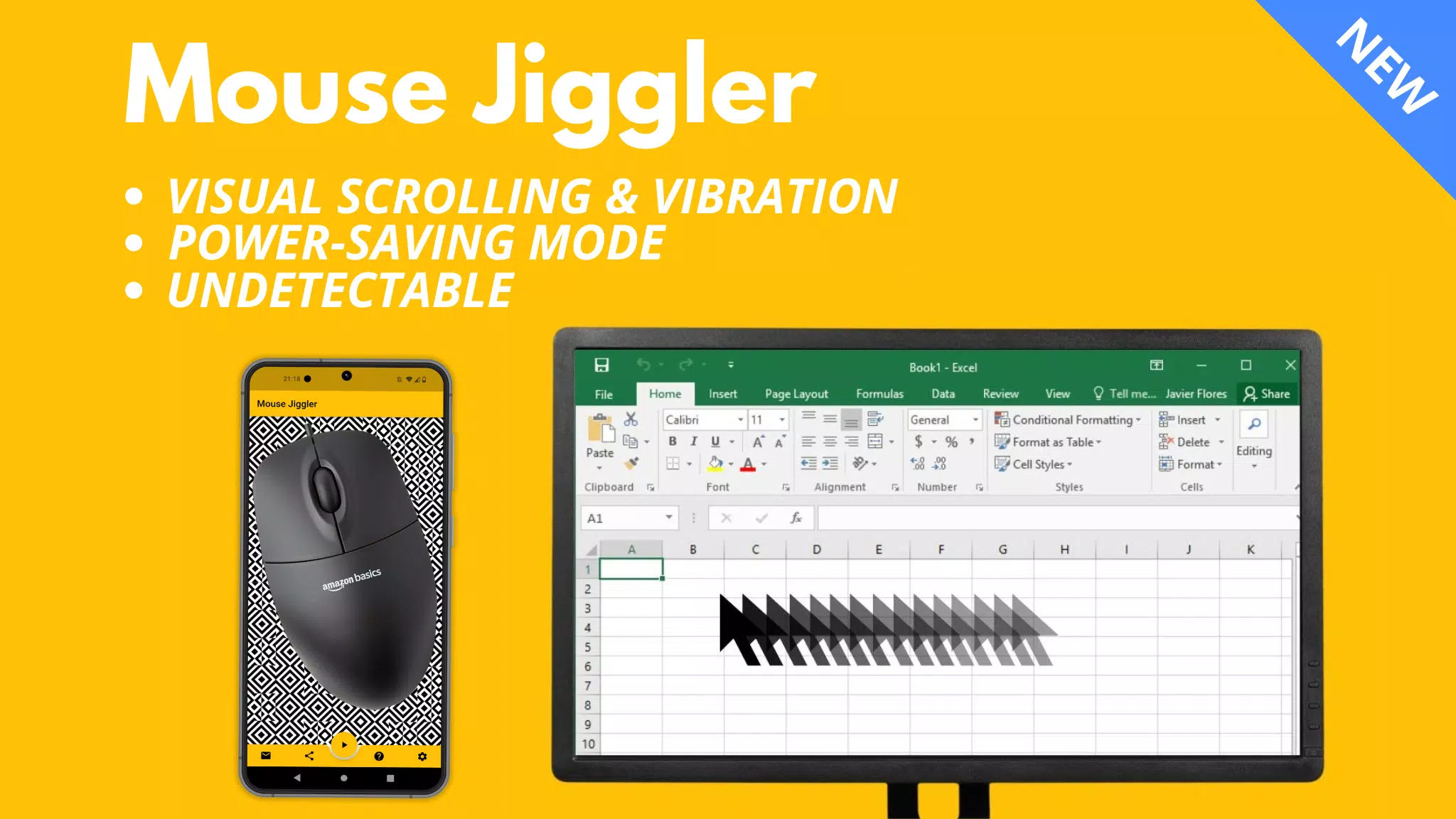
Verhindern Sie, dass Ihr Computerbildschirm mit dem Maus -Jiggler sperrt!
Beschreibung:
Maus Jiggler ist eine vielseitige Anwendung, die sowohl mit Windows- als auch mit Mac OS -Computern kompatibel ist. Sie verhindern, dass Ihr Computerbildschirm in regelmäßigen Abständen ein paar Millimeter ein paar Millimeter auf subtile Weise verschiebt.
⚠️ Kompatibilität:
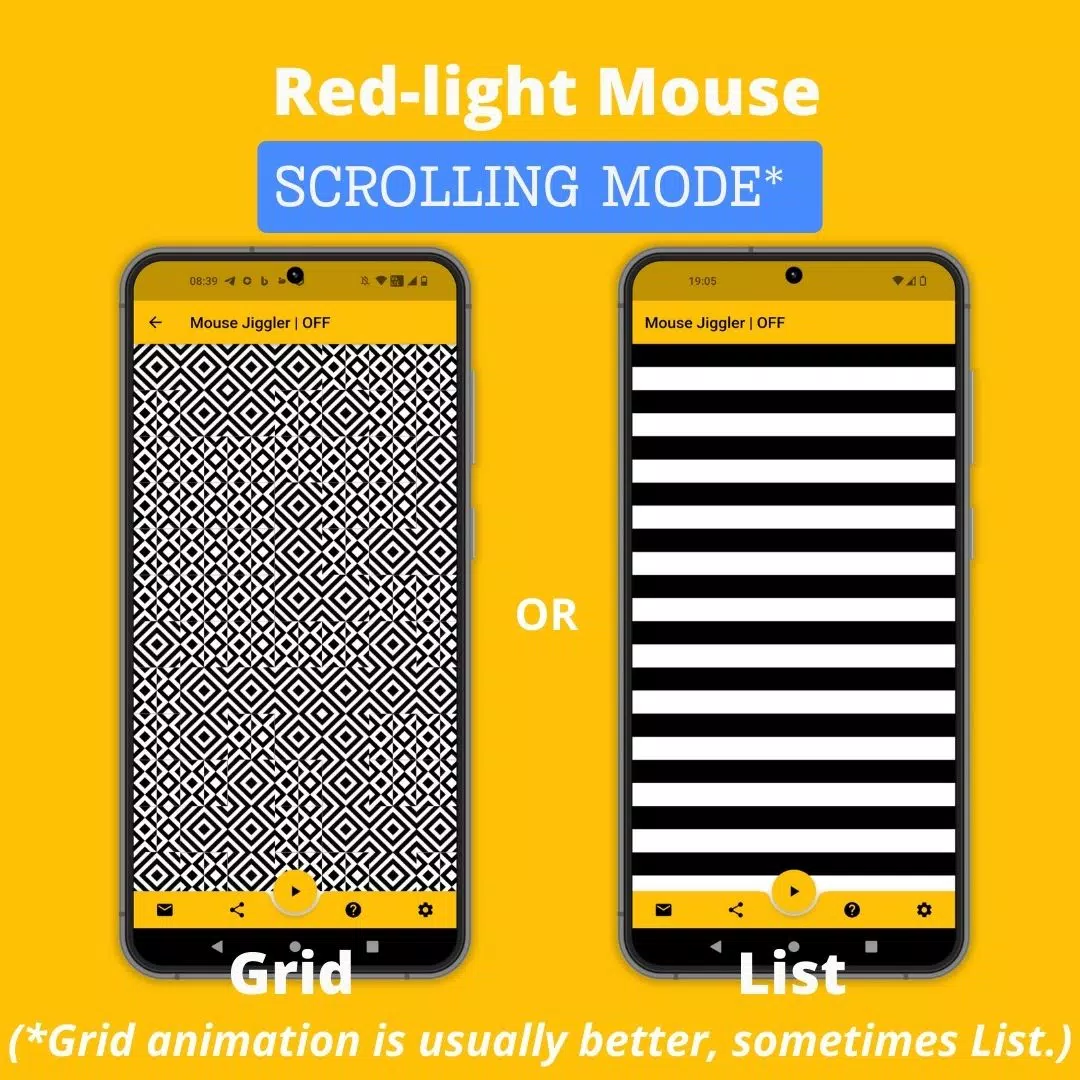
Mouse Jiggler ist für die Verwendung mit den meisten Mäusen mit rotem Licht optimiert. Die Leistung kann jedoch reduziert werden, wenn sie mit Mäusen verwendet werden, die unsichtbares Licht verwenden. Dies ist kein Fehler in der Anwendung, hängt jedoch mit der Empfindlichkeit des Maussensors und den maximalen Helligkeits- und Vibrationsfunktionen des Telefons zusammen. Wenn Sie Probleme haben, erwägen Sie, mit einem roten Licht auf eine Maus zu wechseln. Erforschen Sie alternativ meine neue App "Bluetooth Mouse Jiggler" , für die keine Maus erforderlich ist und hier zu finden ist:
https://play.google.com/store/apps/details?id=be.mm.mousejiggler2
Hauptmerkmale:
Scrolling -Modus : In diesem Modus ideal für Mäuse mit rotem Licht und scrollt ein Bild in festgelegten Intervallen, um den Mauszeiger zu bewegen.
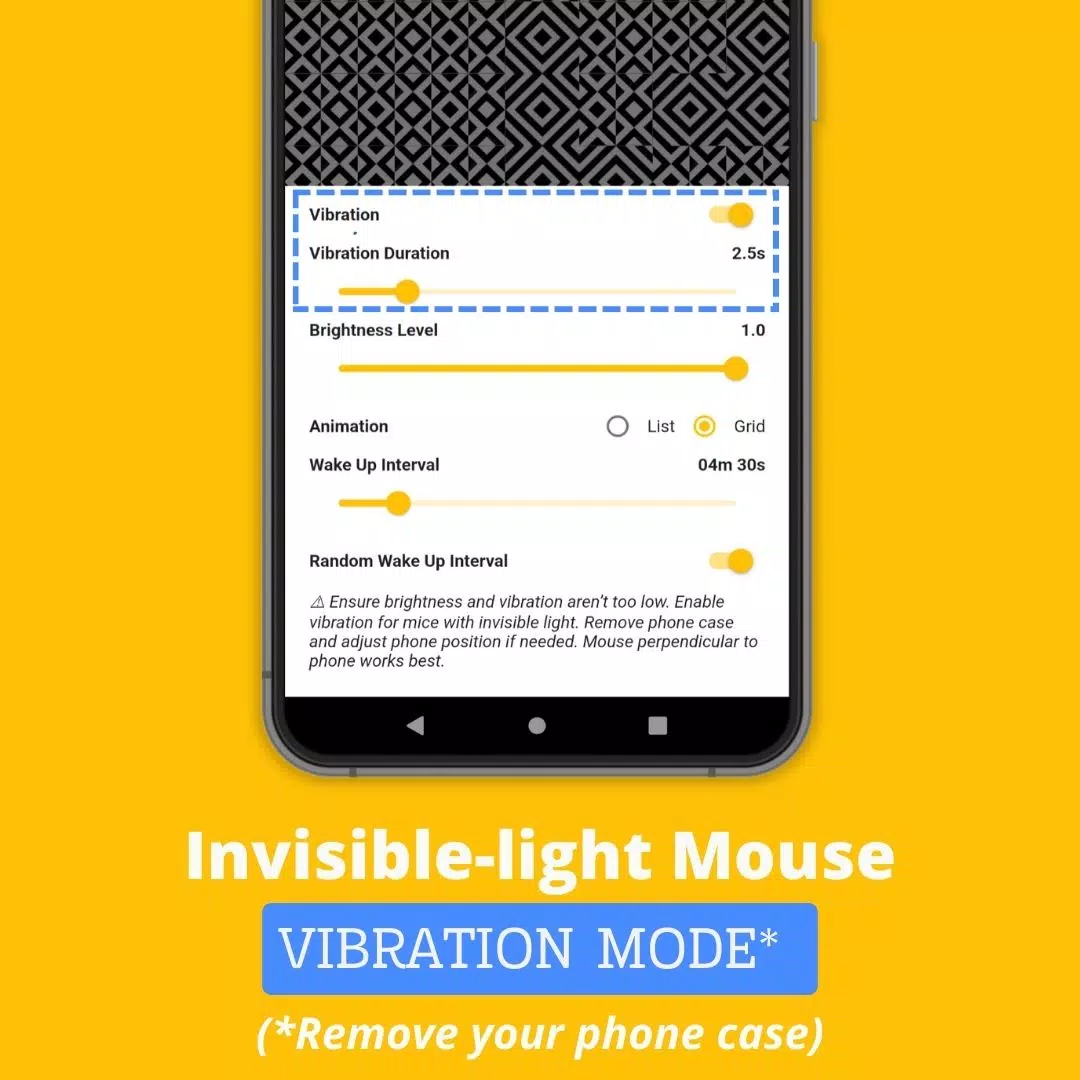
Vibrationsmodus : Dieser Modus für Mäuse mit unsichtbarem Licht verwendet und verwendet die Vibrationen Ihres Telefons in regelmäßigen Abständen, um Ihren Cursor zu verschieben.
So verwenden Sie Maus -Jiggler:
Bestimmen Sie die Art des Lichts, die Ihre Maus verwendet: Rot oder unsichtbar.
Schalten Sie für Mäuse mit unsichtbarem Licht den "Vibrations" -Modus in den App -Einstellungen ein. Um bessere Ergebnisse zu erzielen, entfernen Sie Ihr Telefongehäuse, um die Vibrationsstärke zu verbessern.
Positionieren Sie Ihre Maus auf Ihrem Smartphone.
Initiieren Sie das Scrollen oder Vibrationen, indem Sie auf das ► -Symbol tippen.
Erweiterte Einstellungen:
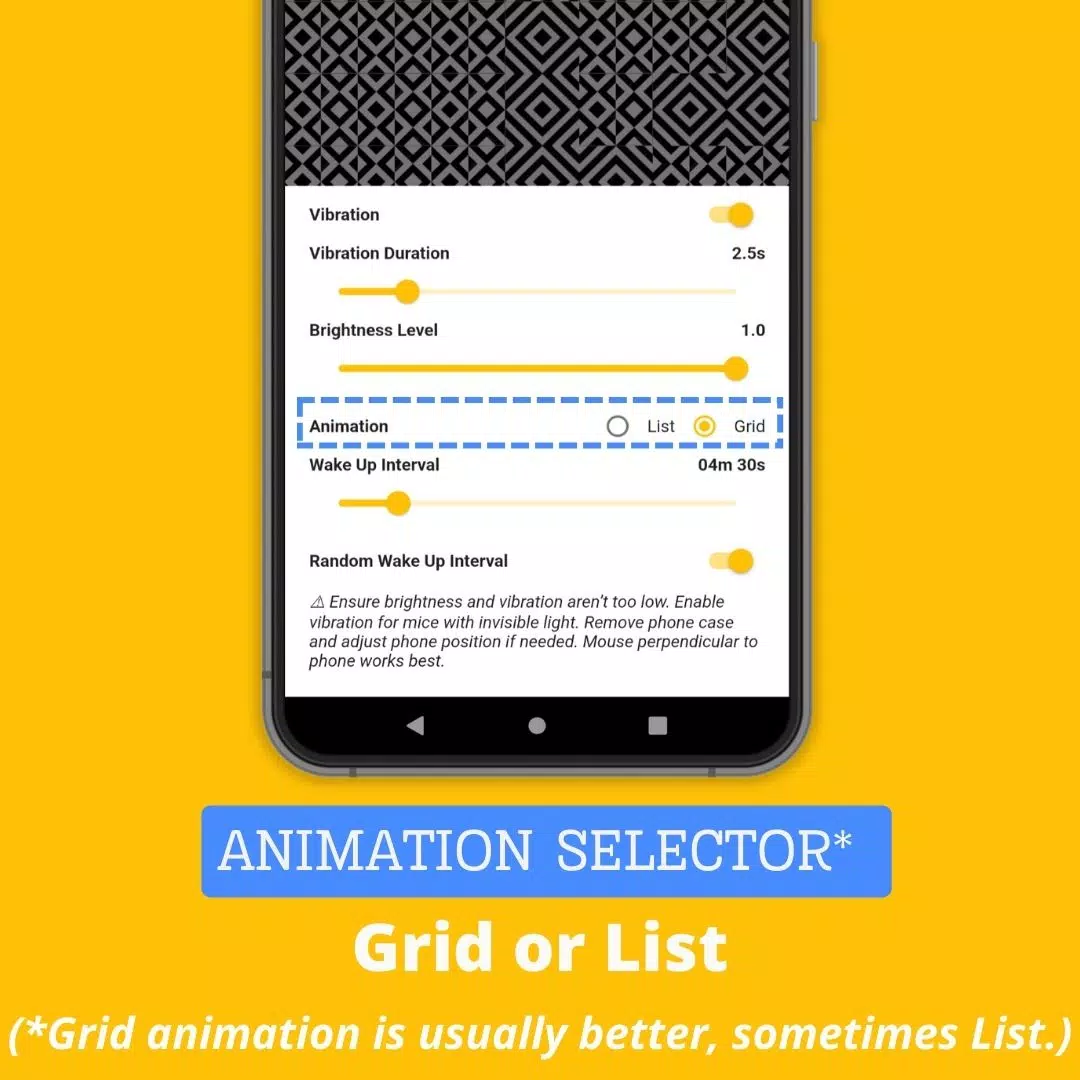
Vibration : Schwingungsmodus ein- oder ausschalten.
Vibrationsdauer : Passen Sie die Länge jeder Schwingung an; Zu kurz eine Dauer kann die Funktionalität beeinträchtigen.
Weckintervall : Legen Sie die Zeit zwischen zwei aufeinanderfolgenden Schriftrollen oder Vibrationen fest.
Helligkeitsstufe : Steuern Sie die maximale Helligkeit, wenn die App aktiviert. Eine unzureichende Helligkeit kann die Leistung beeinflussen.
Zufälliger Weckintervall : Aktivieren Sie eine zufällige Verzögerung zwischen Aktionen, von 0 bis zum festgelegten "Weckintervall". Diese Funktion hilft, die Verwendung von Maus -Jiggler diskret und weniger nachweisbar zu halten.
Warum mobile Maus -Jiggler -App wählen?
Während es verschiedene Methoden gibt, um zu verhindern, dass Ihr Computerbildschirm sperrt, zeichnet sich die mobile Maus -Jiggler -App mit ihren einzigartigen Vorteilen aus:
Komfort : Im Gegensatz zu physischen Maus -Wackelgeräten oder -Nischern benötigt unsere App keine zusätzliche Hardware. Nur Ihr Smartphone und Ihre aktuelle Maus werden benötigt.
Unverzählbarkeit : Als mobile App hinterlässt Maus Jiggler keinen digitalen Fußabdruck, der von den IT -Abteilungen zurückverfolgt werden könnte, was es zu einer sicheren Option für die Verwendung auf Firmenlaptops macht.
Kosteneffizient : Die Maus-Jiggler-App ist kostenlos und bietet eine budgetfreundliche Alternative zu Maus-Wackeln oder-Donglieren, die bis zu 30 US-Dollar kosten können.
Website : https://mousejiggler.lol/
Girls Frontline 2: Exilium Global Website geht live, zusammen mit seinen sozialen Netzwerken!
Top -Fähigkeiten, um Yasuke in Assassins Creed Shadows zu priorisieren
Marvel -Rivalen: Das Verstehen von Bussen und Fangen
Neues Spiel Plus in Assassins Creed Shadows: bestätigt?
Death Stranding 2 Erscheinungsdatum in massivem Trailer vorgestellt
Assassins Creed Shadows -Bewegungen, die von zwei Parkour -Athleten überprüft wurden
Pokemon Go Leak neckt neue Abenteuereffekte
Amazon Music Unlimited: Kostenlose 3-Monats-Testversion verfügbar

"Marvel Mutants: Cyberpunk Card Strategy" A Strategic Guide to Mastering the Digital Apocalypse Deck Set in a grim, neon-drenched future where humanity's evolution has fractured into warring factions—cybernetic warlords, rogue mutants, and AI overlords—Marvel Mutants: Cyberpunk is a collectible card game (CCG) that blends mutant power escalation with high-octane cybernetic augmentation. You play as a mutant with a unique genetic mutation, fused with cutting-edge tech, battling for control of the fractured city of Neo-Genosha. This guide offers a deep dive into advanced strategies, deck archetypes, and meta insights to dominate the battlefield. 🔥 Core Game Mechanics (Quick Refresher) Deck Type: 40-card deck (20 Mutant Cards, 20 Tech/Item Cards) Resource System: "Chroma Points" (CP) generated each turn (1 CP per turn, max 6). Turn Structure: Draw Phase – Draw 1 card. Resource Phase – Gain 1 CP (up to 6). Action Phase – Play cards, activate abilities, attack. End Phase – Discard down to 7 cards. Card Types: Mutant Cards: Represent your core mutant (e.g., Storm, Deadpool, Nightcrawler). Tech Cards: Cybernetic implants, drones, hacking modules, armor, and weapons. Event Cards: Environmental effects, tech glitches, and mutant triggers. Victory Conditions: Reduce opponent’s Health to 0 OR control 3 "Neuro-Zones" (key city districts) for 2 consecutive turns. 🎯 Top 4 Deck Archetypes (Meta 2024) 1. "Neural Overload" – Speed/Combo Mutant Control Focus: Rapid activation, turn-1 threats, synergy between mutant powers and cyber-upgrades. Key Mutants: Kitty Pryde (Phasing) – Use her to bypass defenses and chain attacks. Wolverine (Adamantium Healing) – High durability + aggressive play. Psylocke (Telepathic Dagger) – Instant damage + mental disruption. Key Tech Cards: Neural Jack – Play 1 extra card per turn if you have a "Mind" trait. Overclocked Limb – +2 damage to all attacks, but lose 1 CP per use. Hack: System Crash – Discard 3 random enemy cards. Strategy: Open with Kitty Pryde + Neural Jack → Use her to phase into enemy backline. Activate Wolverine’s Healing on turn 1, then attack with 3 damage. Use Psylocke’s Dagger to deal 3 damage, then sacrifice her for 2 points to trigger Hack: System Crash. Goal: Force opponent to spend resources defending, not attacking. ✅ Best Against: Control decks (e.g., "Chrono-Cult") ❌ Weak To: Long-game stalling (e.g., "Soul Nexus" combos) 2. "Synth-Phoenix" – Sacrifice & Resurrection Focus: Use death as a tactical advantage. Summon powerful mutants from the grave. Key Mutants: Cable (Temporal Weapon) – Can return from discard with 2 energy. Jean Grey (Dark Phoenix) – 10 damage to all if you have 3 or more cards in discard. Emma Frost (Diamond Form) – Prevents damage, but 1 CP to activate. Key Tech Cards: Neural Reboot Core – When a mutant dies, you may return it to hand with 1 CP. Omega Pulse – All enemies lose 2 CP and 1 health. Genesis Protocol – Pay 5 CP to summon a random mutant from your discard. Strategy: Sacrifice lower-cost mutants (e.g., Deadpool) to trigger Neural Reboot Core. Use Cable to return from discard and deal 6 damage with his "Temporal Blaster." Maximize Jean Grey by discarding 3 cards to trigger her "Dark Phoenix" mode on turn 3. ✅ Best Against: Fast aggro decks ❌ Weak To: Instant removal (e.g., "Null Pulse" cards) 3. "Neuro-Grid" – Control & Tempo Focus: Dominate the board with environmental control and draw acceleration. Key Mutants: Professor X (Telepathic Authority) – All enemy cards cost +1 CP. Magneto (Magnetic Field) – Lock down enemy mutants to 1 action per turn. Mystique (Shapeshift) – Copy enemy card and play it as your own. Key Tech Cards: Neuro-Grid Lock – Enemy cannot play more than 1 card per turn. Mirror Echo – Copy the last 2 enemy cards played. Data Surge – Draw 2 cards, but lose 1 CP. Strategy: Turn 1: Play Professor X and Magneto → Lock down opponent's tempo. Use Mystique to steal and play an enemy card (e.g., steal their Overclocked Limb). Chain Neuro-Grid Lock and Mirror Echo to disrupt opponent's plan. ✅ Best Against: All-in aggression ❌ Weak To: Fast combos (e.g., "Neural Overload") 4. "Rogue AI" – Player-Controlled AI Swarms Focus: Summon and evolve AI drones that adapt to your playstyle. Key Mutants: Havok (Nova Blast) – Deal damage based on number of drones. Rachel Summers (Time Rift) – Play a random drone from your deck at the start of your turn. Deadpool (Merc with a Mouth) – Can be played multiple times per turn. Key Tech Cards: AI Swarm Core – Start with 3 drones. Gain 1 drone per turn. Adaptive Code – Drones gain +1 damage every time you play a card. Emergency Protocol – If you have 5+ drones, all drones deal 2 damage to enemy. Strategy: Play AI Swarm Core on turn 1. Use Adaptive Code to buff drones every turn. Let drones grow into a wall of 5+ units by turn 4, then unleash Havok’s Nova Blast for 10+ damage. ✅ Best Against: All decks (if you survive to turn 5) ❌ Weak To: Early disruption (e.g., "System Pulse" removal) 🛠️ Pro Tips for Winning Manage Your CP Wisely Don’t overspend on turn 1. Save 1–2 CP for future combos. Track Your Discard Pile Many powerful abilities trigger from discard (e.g., Jean Grey, Neural Reboot). Plan your plays accordingly. Use "Flicker" Cards Some cards can be played and discarded in one turn (e.g., Hacker Virus). Use them to trigger chain effects. Counter-Play the Meta If everyone plays "Neural Overload," switch to Neuro-Grid to lock them down. Embrace the Chaos Some of the best cards are “unstable” – they have high risk/reward. Use them when you're behind. 🏆 Final Word: Master the Mutation In Marvel Mutants: Cyberpunk, victory isn’t just about power—it’s about adaptation. The mutant who evolves fastest, who thinks two steps ahead, and who knows when to sacrifice for the greater strike… wins. “Mutation isn’t just in your DNA. It’s in your strategy.” 🔥 Want a full decklist template for any archetype? Let me know your preferred playstyle (aggressive, control, combo, or sacrifice), and I’ll build your custom 40-card cyberpunk mutant deck with optimal synergy and win condition. Ready to evolve? 💥
Oct 23,2026

Hyrule Warriors: Age of Imprisonment Update 1.0.2 – Neue Quests und Waffen
Oct 19,2026
Itch.io entfernt NSFW-Erwachseneninhalte aus Such- und Browse-Seiten nach „kritischer“ Druckausübung durch Zahlungspartner
Oct 19,2026

Das Fall-Weltmeisterschaftsfinale von Polytopia beginnt
Oct 18,2026

„Sicher, fahren Sie fort!“ – Kreuzworträtsel-Hinweis - Try Hard Guides
Oct 11,2026
 Kategorie

 Herunterladen













Entdecken Sie die beste professionelle Fotografie -Software! Diese umfassende Überprüfung enthält erstklassige Apps wie Relsens Camera, Photokit AI Photo Editor, Pixlr, YouCam Perfect - Photo Editor, GCAMERA: GCAM & HD Profotos, Photo Studio Pro, Lightleap von LightRicks, Google Camera, Photoshot und Fotoroom. Vergleichen Sie Funktionen, Benutzerbewertungen und Preise, um die perfekte App für Ihre Fotografieanforderungen zu finden, unabhängig davon, ob Sie Anfänger oder Profi sind. Verbessern Sie Ihre Bilder mit KI-angetriebenen Werkzeugen, erweiterten Bearbeitungsfunktionen und atemberaubenden Filtern. Heben Sie noch heute Ihr Fotografiespiel!
Photoroom Studio Photo Editor
Photo Studio PRO
ReLens Camera
Google Pixel-Kamera
Pixlr
YouCam Perfect Fotobearbeitung
PhotoKit AI Photo Editor