
About Mixing Station: Fully Customizable UI, Create Unlimited DCA Groups (IDCAs), Customizable Layers, Layouts, Channel Order, and Multi-Group Labels, RTA Overlay in PEQ/GEQ View, Channel Linking and Relative Ganging, Gain Reduction History for Gate and Dynamics, Peak Hold for All Meters with Editable Hold Times, PEQ Preview in Channel Strip, High Contrast Mode for Outdoor Use, Popgroups, Routing Matrix, Up to 32 Channels Per Layer, Mix Copy, Feedback Detection for Ringing Out Wedges, Additional Features Based on Connected Mixer Model, Conclusion
Mixing Station is a powerful mixing app that gives users a suite of features to make audio mixing simpler and more intuitive. Beyond the capabilities covered earlier, Mixing Station includes several extra tools that make it a flexible solution for live sound engineers, studio producers, and musicians.
Mixing Station offers a fully customizable user interface, letting users design their own layouts, layers, and channel orders. This puts the most-used features right at your fingertips and streamlines your workflow.
With Mixing Station, you can create an unlimited number of DCA groups (IDCAs), making it simple to manage multiple channels simultaneously. This is especially helpful in live sound situations where quick level adjustments are essential.
You can customize layers, layouts, channel order, and multi-group labels in Mixing Station. This helps keep channels organized and clearly labeled, minimizing errors during your mix.
Mixing Station includes a real-time analyzer (RTA) overlay in the PEQ/GEQ view, helping you spot problem frequencies and make precise EQ adjustments.
Link channels together and set up relative-ganging groups in Mixing Station. This lets you adjust multiple channels at once while keeping levels and settings consistent.
Track gain reduction over time for gate and dynamics processing. This visual history helps you fine-tune processing to get the exact sound you're after.
All meters in Mixing Station include a peak hold function with customizable hold times, so you can easily monitor levels and prevent clipping or distortion.
Preview parametric EQ (PEQ) changes directly in the channel strip before applying them. This helps you dial in the perfect sound with confidence.
A high contrast mode is built for outdoor use, improving screen visibility in bright sunlight and reducing eye strain in challenging conditions.
Use Popgroups to assign channels to groups that can be unmuted instantly with one tap—ideal for fast adjustments during live performances.
The routing matrix allows you to route signals between channels and buses, making it easy to build and manage complex signal paths.
Each layer supports up to 32 channels, giving you plenty of mixing capability for various applications and setups.
Copy settings from one mix to another with the mix copy function, speeding up setup and ensuring consistency across mixes.
Feedback detection helps identify and eliminate feedback when ringing out wedges and monitors, resulting in a cleaner, more balanced mix.
Depending on your mixer model, Mixing Station unlocks even more features, offering enhanced flexibility and control.
Mixing Station is a powerful and adaptable mixing application packed with features that make mixing more efficient and intuitive. From its fully customizable interface and flexible channel management to RTA overlays and detailed gain reduction tracking, it delivers professional-grade tools for any mixing scenario.


Girls Frontline 2: Exilium Global Website Goes Live, Along With Its Socials!
Marvel Rivals: Understanding Bussing and Catching It
Top Skills to Prioritize for Yasuke in Assassin’s Creed Shadows
New Game Plus in Assassin's Creed Shadows: Confirmed?
Death Stranding 2 Release Date Unveiled in Massive Trailer
Assassin’s Creed Shadows Movements Reviewed by Two Parkour Athletes
Pokemon GO Leak Teases New Adventure Effects
Amazon Music Unlimited: Free 3-Month Trial Available

BULLPEN(MLBpark)
Download
NetShare - no-root-tethering
Download
ZEPETO: Avatar, Connect & Play
Download
Avatarify: AI Face Animator
Download
Cross DJ Pro - Mix & Remix
Download
Wynk Music: MP3, Song, Podcast
Download
Flat Equalizer - Bass Booster
Download
Magic Fluids: Fluid Wallpaper
Download
Aurora - Poweramp Skin
Download
Legend of YMIR Farming Guide for Early to Mid-Game Progression
Sep 28,2026

Lenovo Labor Day Sale: Top Deals on Legion Gaming Laptops
Sep 26,2026

Mongil: Star Dive has received its first post-launch update, introducing new character Mina
Sep 25,2026
John Wick 5 Will Be Very Different, Says Stahelski
Sep 22,2026
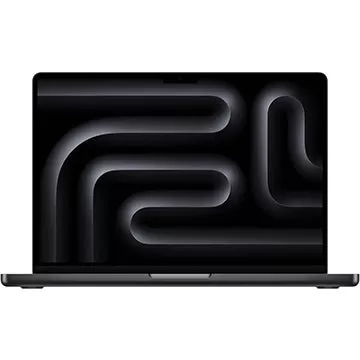
Adorama Is Clearing Out This Apple MacBook Pro M3 Pro Laptop by Offering a $700 Off Discount
Sep 20,2026
 Category

 Download









Discover the best professional photography software! This comprehensive review features top-rated apps like ReLens Camera, PhotoKit AI Photo Editor, Pixlr, YouCam Perfect - Photo Editor, GCamera: GCam & HD Pro Photos, Photo Studio PRO, Lightleap by Lightricks, Google Camera, PhotoShot, and Photoroom. Compare features, user reviews, and pricing to find the perfect app for your photography needs, whether you're a beginner or a pro. Enhance your images with AI-powered tools, advanced editing capabilities, and stunning filters. Elevate your photography game today!
Photoroom AI Photo Editor
Photo Studio PRO
ReLens Camera
Pixel Camera
Pixlr – Photo Editor
YouCam Perfect - Photo Editor
PhotoKit AI Photo Editor