
by Henry Apr 14,2025
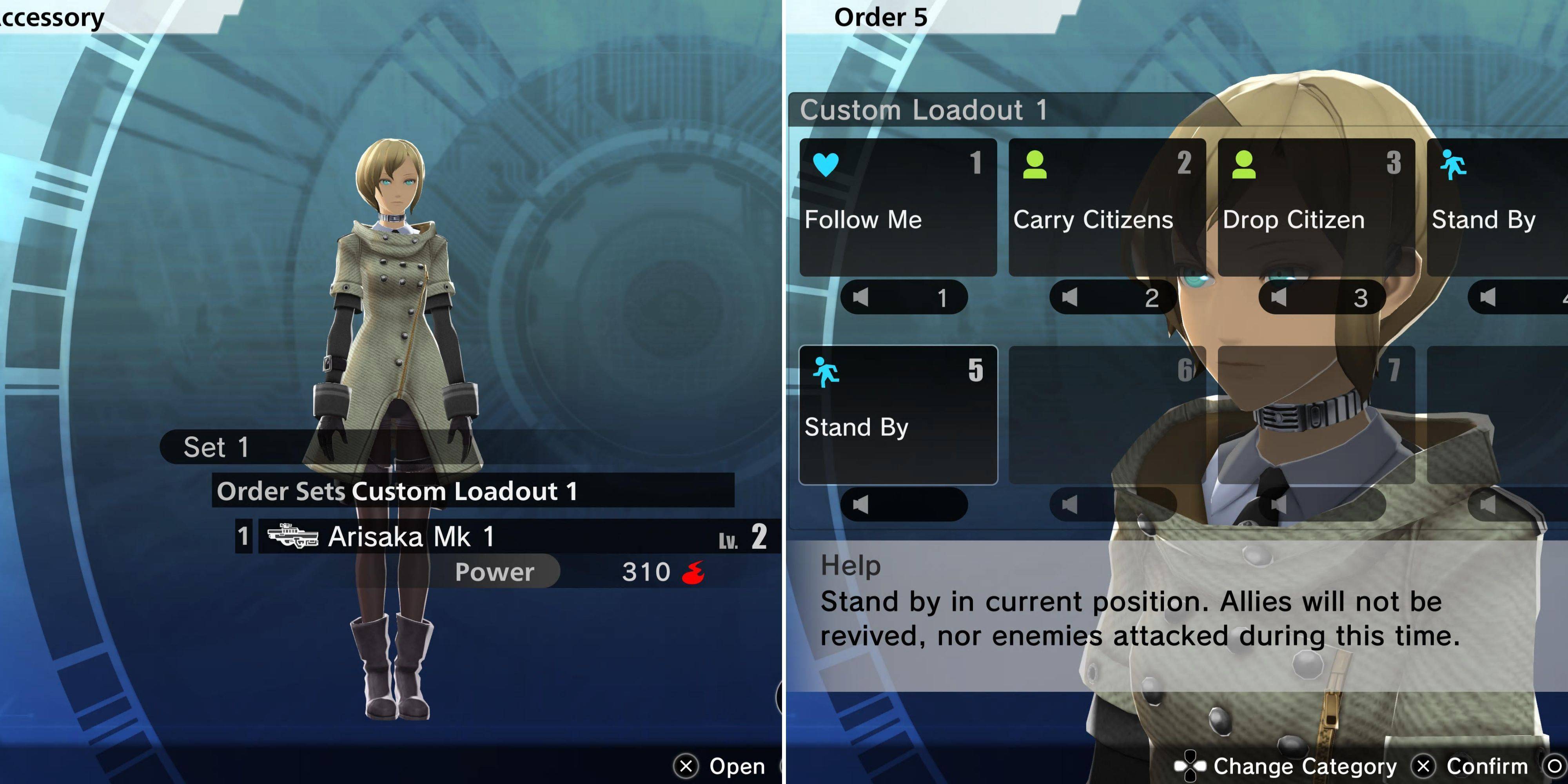
In Freedom Wars remastered während des Betriebs haben Sie die Flexibilität, drei Kameraden zusammen mit Ihrem Zubehör und deren Ausrüstung auszuwählen. Während Sie die Geräte Ihrer Kameraden nicht direkt verwalten können und sich nur auf die Aktualisierung der Gesamtausrüstung konzentrieren, bietet Ihr Zubehör mehr Kontrolle.
Sie können Ihr Zubehör spezifische Befehle ausstellen und ihre Aktionen anpassen, um die Kampfeffizienz zu verbessern. So können Sie Ihr Zubehör effektiv anpassen und befehlen.
Das Anpassen der Ausrüstung Ihres Zubehörs ist unkompliziert, ähnlich wie das Anpassen Ihrer eigenen im Loadout -Menü. Unter Ihren Player -Einstellungen finden Sie die Zubehöroption, die zu einer ähnlichen Loadout -Schnittstelle führt. Ihr Accessoire hat die Vielseitigkeit, jede Waffe auszurüsten, die Sie besitzen, sowie Module, die mit diesen Waffen kompatibel sind.
Ein einzigartiges Merkmal von Zubehör besteht darin, dass sie keine Munition für Waffenwaffen benötigen und sie von Spielercharakteren abheben.
Darüber hinaus können Sie Ihr Zubehör mit einem einzigen Kampfelement ausrüsten, das sie nach eigenem Ermessen verwenden. Denken Sie daran, dass ein Accessoire jeweils nur eine Waffe und einen Kampfelement tragen kann. Ihr wahrer Vorteil liegt jedoch in den speziellen Befehlen, die Sie ihnen nur zuweisen können.
Im Menü "Loadout" können Sie auswählen, welche Bestellungen Ihr Zubehör verwendet. Um diese Bestellungen anzupassen, beteiligen Sie sich mit Ihrem Zubehör in Ihrem Zellen und wählen Sie die Option "Zubehör anpassen" - das fünfte von oben. Mit dieser Funktion können Sie Befehle mit Handpick und in Sets organisieren. Sie können Ihre Befehlsoptionen weiter erweitern, indem Sie "Recht auf Zuordnungsanweisungen" aus dem Fenster der Liberty -Schnittstelle im Bereich Zubehör im Abschnitt Zubehör erwerben.
Nach der Einstellung bleibt der ausgewählte Bestellsatz für Ihr Zubehör während eines Vorgangs festgelegt. Die verschiedenen Befehle, die Sie ausstellen können, umfassen:
Diese Befehle können jederzeit während einer Operation ausgestellt werden, indem Sie auf dem D-Pad oder der 'C'-Taste auf dem PC nach oben drücken. Auf diese Weise kann Ihr Zubehör bestimmte Aufgaben übernehmen, während sich Ihre Kameraden auf breitere Ziele konzentrieren.
Hier sind die wichtigsten Zubehöraufträge, die für eine optimale Leistung von entscheidender Bedeutung sind:
| Befehl | Erläuterung |
|---|---|
| Bürger tragen | Dieser Befehl lenkt Ihr Zubehör auf Shuttle -Bürger zwischen Extraktionspunkten und ermöglicht es Ihnen und Ihren Kameraden, sich auf den Kampf zu konzentrieren. |
| Priorisieren Sie die Wiederbelebung | In intensiven Schlachten stellt dies sicher, dass Ihr Zubehör eng bleibt und Sie sofort wieder belastet, wenn Sie ausgeschaltet werden und Sie im Kampf halten. |
| Rettung Kameraden | Da Ihre Kameraden aufgrund ihrer Dornen kämpfender sind, hält Ihr Team Ihr Team stark. |
| Verwenden Sie medizinische Versorgung | Rüsten Sie Ihr Zubehör mit Erste -Hilfe -Kits aus, um sie in einen engagierten Heiler zu verwandeln und die Gesundheit Ihres Teams beizubehalten. |
Während Ihr Accessoire offensiv zu einer gut angestieften Waffe beitragen kann, ist es oft strategischer, sie mit einer mächtigen Waffe auszurüsten und sie für Unterstützungsrollen zu verwenden, anstatt als Front-Kämpfer.
Girls Frontline 2: Exilium Global Website geht live, zusammen mit seinen sozialen Netzwerken!
Marvel -Rivalen: Das Verstehen von Bussen und Fangen
Neues Spiel Plus in Assassins Creed Shadows: bestätigt?
Top -Fähigkeiten, um Yasuke in Assassins Creed Shadows zu priorisieren
Assassins Creed Shadows -Bewegungen, die von zwei Parkour -Athleten überprüft wurden
Death Stranding 2 Erscheinungsdatum in massivem Trailer vorgestellt
Pokemon Go Leak neckt neue Abenteuereffekte
Amazon Music Unlimited: Kostenlose 3-Monats-Testversion verfügbar
Virtuelle Schwangere Mutter
Herunterladen
Big Brother In Space
Herunterladen
Poppy Pop It Antistress Fidget
Herunterladen
MyLove.
Herunterladen
고스톱 배우 맞고 : 스타 탐정 화투
Herunterladen
Vacation Hotel Stories
Herunterladen
Thief Simulator: Sneak & Steal
Herunterladen
Wolfoo's Town: Dream City Game
Herunterladen
Bull Fight
Herunterladen
Idle Space Farm: A Comprehensive Guide (2024) Your ultimate walkthrough to maximize profits, optimize growth, and become the galaxy's top space farmer! 🌟 Overview Idle Space Farm is a relaxing, clicker-style idle game where you grow crops on alien planets, upgrade your farm, and expand across the galaxy. The goal is simple: passively earn resources, unlock new planets, and build the most efficient farm in the universe. 🌱 1. Core Gameplay Basics Tap to Harvest: Tap your crops to collect resources (Energy, Credits, Seeds, etc.). Auto-Harvest: Enable auto-collection to earn while you’re away. Resource Types: Credits: Main currency. Use for upgrades and new farms. Energy: Required to plant and maintain crops. Replenishes over time. Seeds: Needed to plant new crops. Earned from harvesting. Galactic Dust (Premium): Used for instant upgrades and rare items. 🛠️ 2. Key Systems & Progression 🔧 A. Farm Upgrades Farm Level: Increases crop yield and unlock new features. Upgrade via Credits and Energy. Use Seeds to speed up upgrades. Upgrade Priorities: Harvest Speed (→ more resources per tap). Storage Capacity (→ store more resources). Auto-Harvest Efficiency (→ works while you sleep). 🌌 B. Planet Unlocking Start on Planet 1 (Terra Prime) → Progress to: Planet 2 (Aurora-9) – Faster growth, rare seeds. Planet 3 (Nova-7) – Higher yield, special crops. Planet 4 (Zyphar) – Elite farming zones. Unlock Requirements: Reach Farm Level 10 → Unlock Planet 2. Collect 100,000 Credits → Unlock Planet 3. Complete 300 daily tasks → Unlock Planet 4. ✅ Pro Tip: Use Galactic Dust to instantly unlock planets if you're impatient. 🌿 C. Crop Types & Management Crop Effect Best For Solar Bloom Fast harvest, low yield Early game Quantum Grain High yield, needs energy Mid-game Stellar Berries Rare drops, sells for premium Late game Nebula Roots Passive energy gain Max efficiency Rotate crops based on energy cost vs. profit. Use “Crop Advisor” (in-game tool) to auto-optimize. ⚙️ 3. Advanced Optimization Tips 🔁 A. Synergy Builds “Energy Loop”: Use Solar Bloom + Energy Recharger Module → Gives energy back on harvest → 100% uptime. “Auto-Compound”: Set up 3 farms with different crops → each generates resources to feed the next. 🔄 B. Daily & Weekly Tasks Complete Daily Challenges for: 500 Credits 50 Seeds 1 Galactic Dust (rare) Weekly Quests: Unlock exclusive seed types and planet skins. 🎯 C. Power-Ups & Boosts Speed Boost (x2 Harvest): Use during peak hours (10 AM – 2 PM local time). Double Credits (2x): Buy with Galactic Dust or earn via events. Energy Vault: Stores excess energy for future use. 💰 4. Maximize Earnings: Pro Strategies ✅ Golden Rules of Idle Farming Always keep energy above 50% – Don’t let your farm go idle. Use auto-harvest 24/7 – Even when offline, your farm earns. Save seeds for high-tier crops – Don’t waste on low-profit plants. Reinvest 80% of profits – Let compounding grow your empire fast. 📈 Profit Formula (Estimate) Daily Earnings = (Harvest Speed × Crop Yield × Farm Multiplier) / 100 Goal: Reach 10,000+ Credits/day by Farm Level 25. 🎮 5. Events & Special Features Galactic Harvest Festival (Monthly): 3x Credits for 48 hours. Special event crops (e.g., Celestial Apples) → 50% more seeds. Farming Tournament (Weekly): Rank against other players. Win Galactic Dust, exclusive seeds, and skins. 🏆 Top Tip: Join events → boost profit 3–5x temporarily. 🛑 6. Common Mistakes to Avoid ❌ Spending all Galactic Dust on one upgrade ✅ Use it for multiple small boosts across farms. ❌ Over-investing in low-tier crops ✅ Focus on high-yield, low-energy crops. ❌ Ignoring energy limits ✅ Always monitor energy → prevent "dead zones". 🌠 Final Words: Become the Galactic Overlord! With smart upgrades, event participation, and steady compounding, you can go from Terra Prime Farmer to Galaxy Emperor of Harvests in under a month. 🌍 Final Goal: Reach Farm Level 50, unlock Dark Nebula Planet, and grow the Ultimate Crop: The Infinite Bloom. 📌 Quick Reference Cheat Sheet Goal How to Achieve 10k Credits/day Farm Level 25+, 3x auto-harvest Unlock Planet 4 300 tasks, 200k Credits Get Galactic Dust Events, daily quests, purchases Maximize profit Rotate crops, use energy loops 🎮 Pro Tip: Turn on notifications and daily reminders – consistency is key! 🌱 Happy Farming, Space Farmer! The galaxy is waiting for your next harvest. 🔗 Download Idle Space Farm on Google Play / App Store now! 🌟 Join the Galactic Farming Discord for tips and events! Last Updated: April 2024 | Game Version: 2.4.1
Apr 02,2026
GOG stellt Ein-Klick-Mods vor, Skyblivion kommt noch in diesem Jahr
Mar 30,2026

As of now, The Darkside Detective is indeed available as a free mobile game on the Epic Games Store. The game, developed by Visceral Games and published by Epic Games, offers a noir-style detective adventure with a gripping narrative, stylized visuals, and a unique blend of investigation and supernatural elements. Players take on the role of a private investigator navigating a gritty urban world filled with mysteries, strange occurrences, and moral ambiguity. The game features top-down exploration, dialogue choices that affect outcomes, and a haunting atmosphere that draws you into its dark, cinematic world. Since it’s a free-to-play title on the Epic Games Store, players can download and enjoy the full game at no cost, though it may include optional in-app purchases for additional content. Note: Availability and pricing may vary by region and over time, so it's a good idea to check the Epic Games Store directly for the most up-to-date details. Stay tuned—epic detective stories are just a tap away! 🔍🌑
Mar 29,2026

Randy Pitchford verteidigt Borderlands 4-Äußerung in offizieller Stellungnahme
Mar 28,2026
The recent surge of fan art featuring a Pokémon resembling Ho-Oh—specifically, a strikingly similar design with vibrant, phoenix-like plumage, a radiant golden body, and a majestic, ethereal presence—has sparked debate across fan communities. While some fans enthusiastically embrace the artwork as inspired homage or creative reinterpretation, others are quick to accuse the artist of plagiarism, arguing that the design is too close to the official Ho-Oh model created by Game Freak and Nintendo. The controversy centers on how closely the fan artwork mirrors Ho-Oh’s iconic features: the seven distinct feather sections, the glowing red and gold color scheme, and the overall silhouette. Critics point to the uncanny similarity in composition and visual storytelling, suggesting that the artwork may cross the line from tribute to infringement—especially if it's shared commercially or used in promotional contexts. However, defenders of the artwork argue that Ho-Oh is a well-known mythological bird in Japanese folklore and a staple of the Pokémon franchise, making it a legitimate source of inspiration. They emphasize that fan art often draws from established designs to explore new interpretations, and that original elements—such as unique wing patterns, background details, or emotional expressions—can still make the piece a personal creation. Legal experts note that while copyright law protects the specific artistic expression of official characters like Ho-Oh, simple homage or stylized reinterpretations often fall under fair use, particularly in non-commercial fan communities. That said, using such artwork for profit or misleading branding (e.g., selling it as official merchandise) could indeed invite legal issues. Ultimately, whether this is plagiarism or creative homage depends on context: the artist’s intent, originality of details, and how the artwork is used. The debate reflects broader tensions in fan culture—where admiration for a beloved character can blur into questions of ownership and authenticity. For now, the discussion continues online, with fans on both sides sharing their perspectives. The takeaway? Art inspired by iconic characters is common and often celebrated—but it's the nuance, originality, and respect for intellectual property that determine whether it’s seen as homage or infringement.
Mar 26,2026
 Kategorie




