by Henry Apr 14,2025
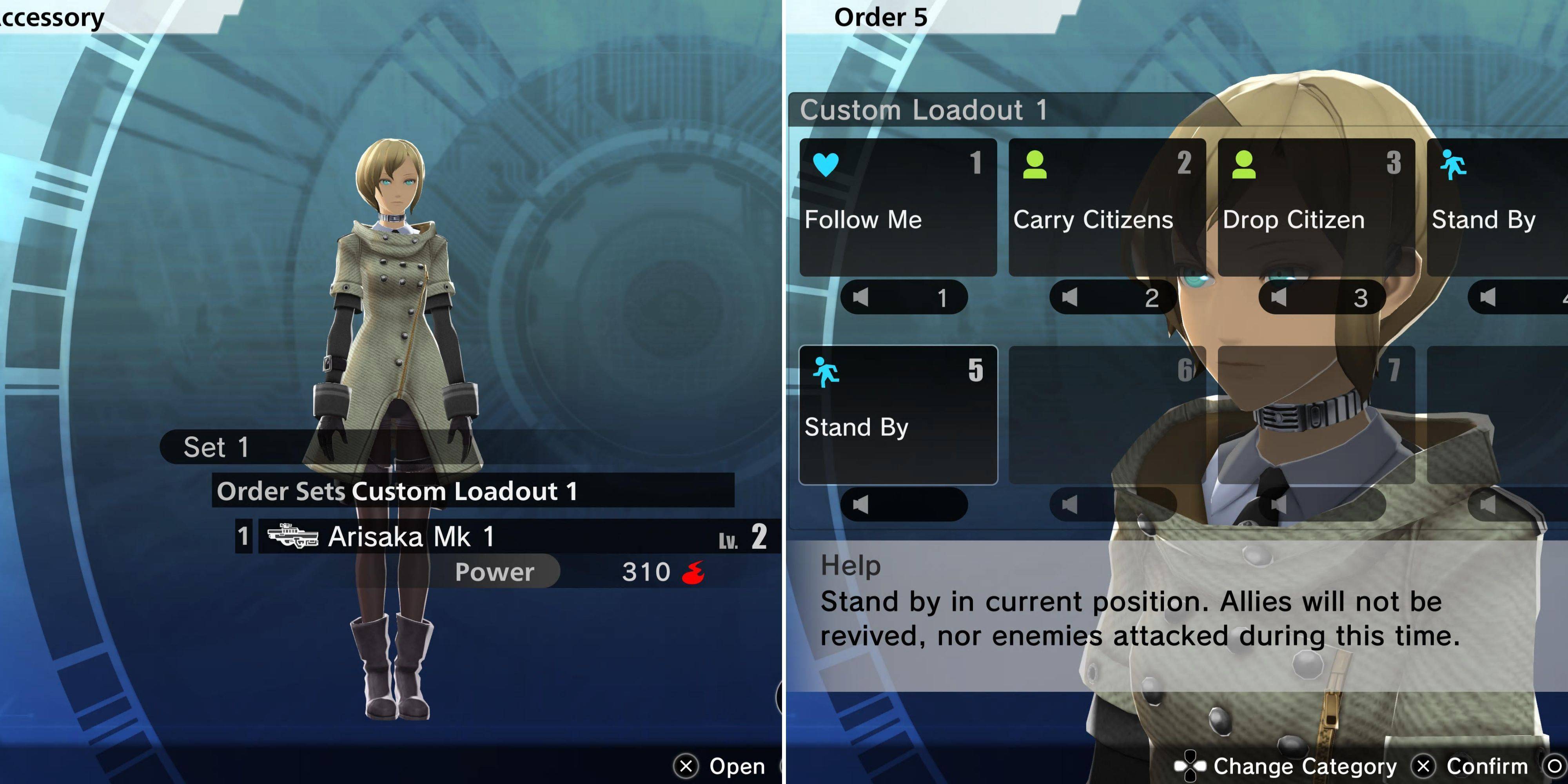
In Freedom Wars Remastered, during Operations, you have the flexibility to select three comrades to join you, along with your Accessory and their gear. While you can't directly manage the equipment of your comrades, focusing only on upgrading their overall gear, your Accessory offers more control.
You can issue specific commands to your Accessory, tailoring their actions to enhance combat efficiency. Here’s how you can customize and command your Accessory effectively.
Customizing your Accessory's gear is straightforward, much like customizing your own within the Loadout menu. Just below your player settings, you'll find the Accessory option, which leads to a similar loadout interface. Your Accessory has the versatility to equip any weapon you own, as well as Modules that are compatible with those weapons.
A unique feature of Accessories is that they don't require ammunition for gun weapons, setting them apart from player characters.
Additionally, you can equip your Accessory with a single combat item, which they'll use at their discretion. Remember, an Accessory can only carry one weapon and one combat item at a time. However, their true advantage lies in the specialized commands you can assign just to them.
From the Loadout menu, you can select which set of Orders your Accessory will use. To customize these Orders, engage with your Accessory in your cell, selecting the "Customize Accessory" option—the fifth from the top. This feature allows you to handpick commands and organize them into sets. You can further expand your command options by purchasing "Right To Assign Orders Entitlements" from the Window of Liberty Interface Entitlements under the Accessory section.
Once set, the chosen Order Set for your Accessory remains fixed throughout an Operation. The various commands you can issue include:
These commands can be issued at any time during an operation by pressing up on the D-pad or the 'C' key on PC. This allows your Accessory to undertake specific tasks, while your comrades focus on broader objectives.
Here are the top Accessory Orders that are crucial for optimal performance:
| Order | Explanation |
|---|---|
| Carry Citizen | This command directs your Accessory to shuttle citizens between extraction points, allowing you and your comrades to concentrate on combat. |
| Prioritize Revival | In intense battles, this ensures your Accessory stays close and revives you immediately upon being knocked out, keeping you in the fight. |
| Rescue Comrades | Since your comrades are more combat-effective due to their Thorns, having your Accessory revive them keeps your team strong. |
| Use Medical Supplies | Equip your Accessory with First Aid Kits to turn them into a dedicated healer, maintaining the health of your team. |
While your Accessory can contribute offensively with a well-upgraded weapon, it's often more strategic to equip them with a powerful gun and utilize them for support roles rather than as frontline fighters.
Girls Frontline 2: Exilium Global Website Goes Live, Along With Its Socials!
Marvel Rivals: Understanding Bussing and Catching It
New Game Plus in Assassin's Creed Shadows: Confirmed?
Top Skills to Prioritize for Yasuke in Assassin’s Creed Shadows
Assassin’s Creed Shadows Movements Reviewed by Two Parkour Athletes
Death Stranding 2 Release Date Unveiled in Massive Trailer
Pokemon GO Leak Teases New Adventure Effects
Amazon Music Unlimited: Free 3-Month Trial Available

Alien RPG: Idle Space Farm Guide
Apr 02,2026
GOG unveils one-click mods, Skyblivion arrives this year
Mar 30,2026

The Darkside Detective Is This Week’s Free Mobile Game on the Epic Games Store
Mar 29,2026

Randy Pitchford Defends Borderlands 4 Comment in Statement
Mar 28,2026
Pokémon Players Now Think Another Card 'Looks Very Similar' to Fan Art, but Others Aren't Convinced This Is a Ho-Oh Plagiarism Situation
Mar 26,2026
 Category