by Owen Feb 11,2025
Mastering Fortnite Ballistic: Optimal Settings for First-Person Combat
Fortnite, while not traditionally a first-person shooter, introduces Ballistic, a game mode that changes the perspective. This guide highlights the best settings for Fortnite Ballistic to enhance your gameplay.
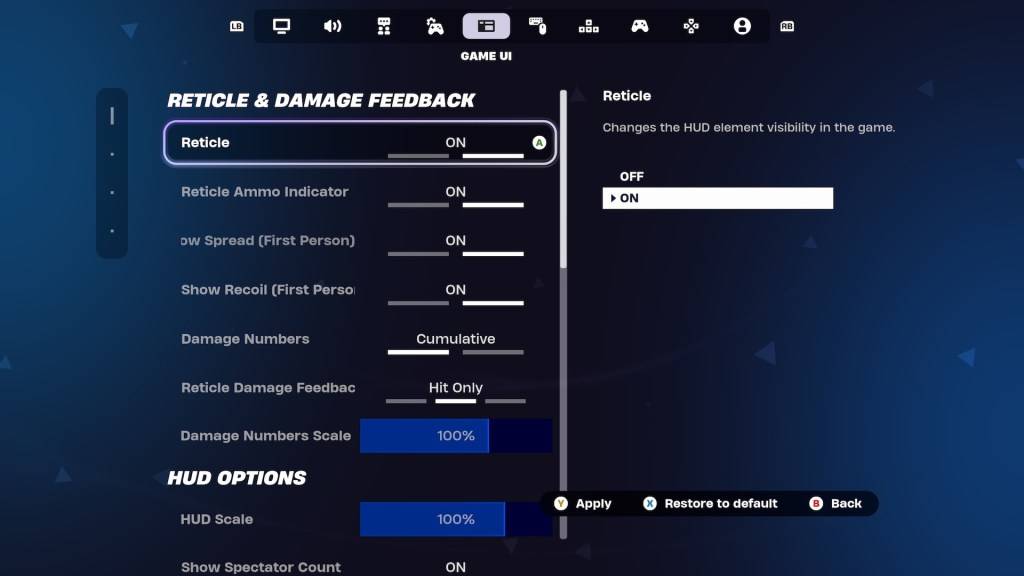
Experienced Fortnite players often have meticulously crafted settings. Recognizing this, Epic Games provides Ballistic-specific adjustments within the Game UI's Reticle & Damage Feedback tab. Let's explore these crucial settings and their recommended configurations:
Show Spread (First Person): OFF
This setting typically expands the reticle to visualize weapon spread. However, in Ballistic, hip-firing is surprisingly effective. Disabling this setting simplifies reticle focus, improving headshot accuracy.
Show Recoil (First Person): ON
Recoil is a significant challenge in Ballistic. Keeping this setting enabled allows the reticle to reflect recoil, providing visual feedback. This is particularly beneficial when using Assault Rifles, whose power compensates for reduced accuracy.
Alternative: No Reticle
For highly skilled players aiming for top-tier performance in Ranked mode, completely disabling the reticle offers maximum control. This requires significant practice and precision.
These adjustments represent the optimal settings for Fortnite Ballistic. For additional tips, explore how to utilize Simple Edit in Battle Royale.
Fortnite is available on various platforms, including Meta Quest 2 and 3.
Girls Frontline 2: Exilium Global Website Goes Live, Along With Its Socials!
Marvel Rivals: Understanding Bussing and Catching It
New Game Plus in Assassin's Creed Shadows: Confirmed?
Top Skills to Prioritize for Yasuke in Assassin’s Creed Shadows
Death Stranding 2 Release Date Unveiled in Massive Trailer
Assassin’s Creed Shadows Movements Reviewed by Two Parkour Athletes
Pokemon GO Leak Teases New Adventure Effects
Amazon Music Unlimited: Free 3-Month Trial Available

Unison League teams up with Hatsune Miku and top Vocaloid idols
May 02,2026

Shelby American Teams With PUBG Mobile
May 02,2026
Capcom Teases Resident Evil 9 Celebrating RE4 Sales
Apr 30,2026

Baki the Grappler Joins Two Strikes on Crunchyroll Game Vault
Apr 30,2026
Gaming Monitors Impress at Computex 2025
Apr 29,2026
 Category