
by Brooklyn Mar 29,2025
With the arrival of spring, baseball season kicks off, and fans eagerly await the latest release from San Diego Studio, *MLB The Show 25*. This year's installment promises a lot, but to truly excel at the plate, you'll need to fine-tune your hitting settings. Here, we break down the best hitting configurations for *MLB The Show 25* to help you make solid contact and power those home runs.
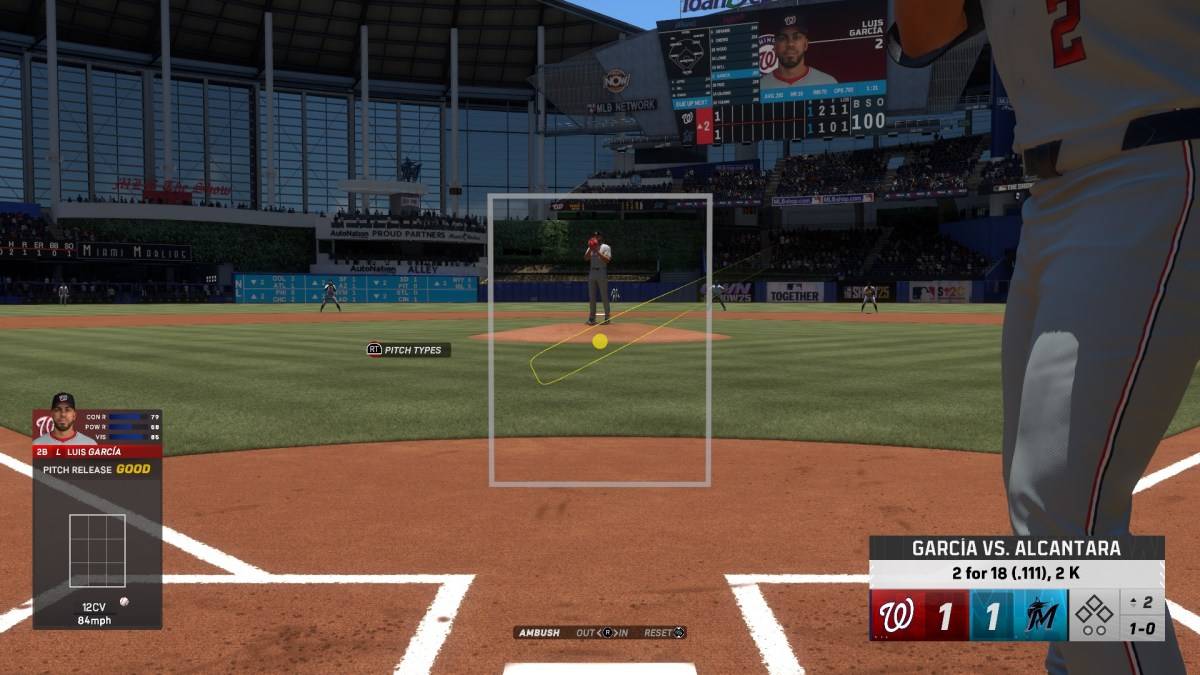
Once you launch *MLB The Show 25* and navigate through the initial setup, head straight to the settings menu. You'll find a plethora of options that let you tailor your hitting experience. While it might seem daunting to adjust these settings, we're here to guide you through the process and help you lay a strong foundation for your gameplay.
| **Best Hitting Interface in MLB The Show 25** |
| Zone |
As with previous entries in the *MLB The Show* series, the Zone hitting interface remains the top choice for *MLB The Show 25*. This setting gives you the ultimate control, allowing you to maneuver the Plate Coverage Indicator (PCI) freely within the batter's box. While it can be nerve-wracking to rely on your PCI placement, mastering it will give you the edge needed to capitalize on those hanging curveballs.
| **Best PCI Settings in MLB The Show 25** |
| PCI Center – Bat |
| PCI Inner – None |
| PCI Outer – None |
| PCI Color – Yellow |
| PCI Opacity – 80% |
| PCI Fadeout – None |
While PCI settings can be highly personalized, the configuration above is designed to simplify the hitting process. By setting the PCI Center to Bat, you can better visualize where the ball will make contact with the bat, aiming for that sweet spot on the barrel. With practice, hitting that perfect spot will feel as routine as catching a pop fly.
You might need to adjust the Color and Opacity settings based on the game's lighting conditions. Yellow is ideal for day games, but consider switching to Blue or Green for better visibility during night games.
Feel free to experiment with the new PCI Anchor settings, which let you adjust the anchor point based on the batter and pitcher. While these tweaks didn't make a significant difference for us, they might just be the key to your hitting success.
| **Best Hitting View in MLB The Show 25** |
| Strike Zone 2 |
While mastering the PCI is crucial, choosing the right hitting view is equally important. Positioning the camera too far back can distract you with peripheral elements, making it hard to focus on the pitcher. Strike Zone 2 offers the perfect balance, immersing you in the action just as the ball comes hurtling toward you.
And that wraps up our guide on the best hitting settings for *MLB The Show 25*. Implement these settings, and you'll be well on your way to crushing those home runs and dominating at the plate.
*MLB The Show 25* is now available in Early Access on PlayStation 5 and Xbox Series X|S.
Girls Frontline 2: Exilium Global Website Goes Live, Along With Its Socials!
Marvel Rivals: Understanding Bussing and Catching It
New Game Plus in Assassin's Creed Shadows: Confirmed?
Top Skills to Prioritize for Yasuke in Assassin’s Creed Shadows
Assassin’s Creed Shadows Movements Reviewed by Two Parkour Athletes
Death Stranding 2 Release Date Unveiled in Massive Trailer
Pokemon GO Leak Teases New Adventure Effects
Amazon Music Unlimited: Free 3-Month Trial Available
Checkers, draughts and dama
Download
Dinosaur Games City Rampage
Download
Ephod
Download
Moonlight Sculptor: DarkGamer
Download
Paper Dolls Diary DIY Dress Up
Download
Airbus Simulator Airplane Game
Download
Fill The Fridge Organizer Game
Download
Anato Trivia
Download
Horizon Driving Simulator
DownloadNetflix and PBS to Stream New Sesame Street Episodes After HBO Max Deal Ends
Apr 07,2026

Eternity's Bastion Season 2 Debuts Post-EVA 2025 Triumph
Apr 02,2026

Alien RPG: Idle Space Farm Guide
Apr 02,2026
GOG unveils one-click mods, Skyblivion arrives this year
Mar 30,2026

The Darkside Detective Is This Week’s Free Mobile Game on the Epic Games Store
Mar 29,2026
 Category




